
Mobile smartphones are the primary gaming device for over 85% of online entertainment enthusiasts in Bangladesh. The official Khela88 Android Application Package (APK) provides players with faster page load speeds, reduced mobile data consumption on local networks like Grameenphone and Banglalink, and seamless integration with mobile financial services such as bKash and Nagad.
However, due to the wide diversity of Android hardware, custom operating system skins (such as Xiaomi's HyperOS/MIUI, Samsung's One UI, and Vivo's Funtouch OS), and periodic telecom routing adjustments, users occasionally experience technical errors. These issues can include installation failures ("Parse Error"), abrupt application crashes on launch, frozen live dealer video feeds, or delayed SMS verification codes. This comprehensive technical troubleshooting guide provides step-by-step solutions to resolve every common mobile app issue, ensuring a smooth, secure entertainment experience on your device.
The Four Most Common Android Mobile Errors
Most technical obstacles encountered when installing or running the Khela88 application originate from device-level operating system permissions, outdated system components, or low internal storage:
[Issue Identified] ──► [Inspect Android Storage & Permissions] ──► [Clear Application Cache] ──► [Update Android System WebView] ──► [Normal Operation Restored]"Problem Parsing the Package" (Parse Error)
A "Parse Error" occurs during the initial installation attempt before the app is fully installed on your phone. This error typically happens when:
- The downloaded
.apkfile was corrupted or interrupted due to an unstable mobile data connection. - Your smartphone's operating system is running an older Android version (below Android 7.0 Nougat) that is incompatible with the app's modern API libraries.
- The security settings on your device blocked the installer before verifying the package signature.
"App Not Installed" Error
This message appears when Android aborts the installation process halfway through. The primary causes include:
- Insufficient Device Storage: Your phone's internal memory does not have enough free space to extract and unpack the application files (minimum 150 MB required).
- Conflicting Prior Build: An older, corrupted version of Khela88 is already installed on your device with conflicting cryptographic keys.
- Google Play Protect Blocking: Android's default security scanner flags the external file because it was downloaded outside the Google Play Store.
Application Crashing or Freezing on Launch
When the app opens to a black or white screen and immediately shuts down, the issue is almost always tied to:
- An outdated Android System WebView or Google Chrome browser component.
- Aggressive background RAM management on custom Android skins (Xiaomi, Vivo, Oppo) closing the app prematurely.
- Accumulated corrupted cache data in your device's application manager.
OTP SMS Verification Timeout
When logging in or resetting a password, the required 6-digit verification code may fail to arrive within the standard 60-second countdown due to regional SMS gateway congestion or carrier Do-Not-Disturb (DND) filtering on your mobile number.
Step-by-Step Diagnostic Matrix and Immediate Fixes
Use this technical matrix to resolve your specific application issue quickly:
| Error Symptom | Root Cause | Immediate Resolution Procedure |
|---|---|---|
| "Parse Error" during installation | Corrupted download or Android OS version below 7.0. | Delete the existing .apk file from your Downloads folder. Restart your phone, connect to a stable Wi-Fi connection, and download a fresh package from the official portal. Verify Android version under Settings ➔ About Phone. |
| "App Not Installed" | Conflicting older version or full storage. | 1. Uninstall any existing Khela88 icon from your home screen. 2. Clear at least 200 MB of internal storage by deleting unused media. 3. Reinstall the newly downloaded package. |
| "Blocked by Play Protect" | Google Play Protect flagging an unsigned third-party app. | On the warning pop-up window, tap "More details", then select "Install anyway (unsafe)". The official build is scanned clean of viruses and adware. |
| App closes immediately after opening | Outdated WebView or corrupted cache. | Open Google Play Store. Search for "Android System WebView" and "Google Chrome" and tap Update. Then navigate to Settings ➔ Apps ➔ Khela88 ➔ Storage ➔ Clear Cache. |
| Live casino stream lagging / freezing | Network packet loss or low RAM. | Lower the stream video quality inside the game menu from 1080p to 480p/720p. Close all background applications to free up system memory. |
| OTP SMS not arriving | Telecom SMS gateway delay or spam filtering. | Check your mobile phone's SMS "Spam and Blocked" folder. Ensure cellular reception has at least 3 bars. Wait 2 minutes and tap "Resend Code". |
Device-Specific Optimization Guide
Different smartphone manufacturers apply customized battery-saving profiles that can restrict the Khela88 application from functioning smoothly in the background. Follow the specific instructions for your device brand:
Xiaomi / Redmi / Poco (MIUI & HyperOS)
- Long-press the Khela88 app icon on your home screen and tap "App Info" (the
isymbol). - Scroll down to "Battery Saver" and switch the setting from "MIUI Battery Saver" to "No Restrictions".
- Under "Permissions", ensure that "Autostart" is toggled ON to allow real-time push notifications for cricket matches and withdrawal updates.
- Open Settings ➔ Apps ➔ Khela88.
- Tap on "Battery" and select "Unrestricted".
- Tap on "Storage" and select "Clear Cache" (do not select "Clear Data" unless you wish to re-enter your login credentials).
- Navigate to Settings ➔ Battery ➔ Background Power Consumption Management.
- Locate Khela88 and select "Allow high background power usage".
- This prevents the operating system from abruptly terminating your active session during live baccarat rounds or Aviator flights.
- Open your phone's native Settings application.
- Scroll down and select "Apps" or "Manage Applications".
- Scroll through the alphabetical list and tap on Khela88.
- Tap on "Storage & Cache".
- Tap "Clear Cache". Important: Clearing the cache will not delete your account balance or user settings. It simply removes temporary image assets.
- Restart your smartphone and reopen the Khela88 app.
- Download Exclusively from Official Portal Links: Never download a Khela88 APK file from social media forums, media-sharing websites (such as MediaFire or 4Shared), or unofficial Telegram download bots.
- Verify File Size: The authentic Khela88 Android installation file is approximately 28 MB to 32 MB. Files smaller than 10 MB or larger than 80 MB are likely fraudulent packages containing unwanted bloatware or malware.
- Inspect App Permissions: During installation, the authentic app requests only standard network permissions (Internet and Network State). It will never ask for administrative device permissions, access to your camera, or permission to read your personal contacts.
Samsung (One UI)
Vivo / Oppo / Realme (Funtouch OS & ColorOS)
How to Clear Cache and Reset Application Data
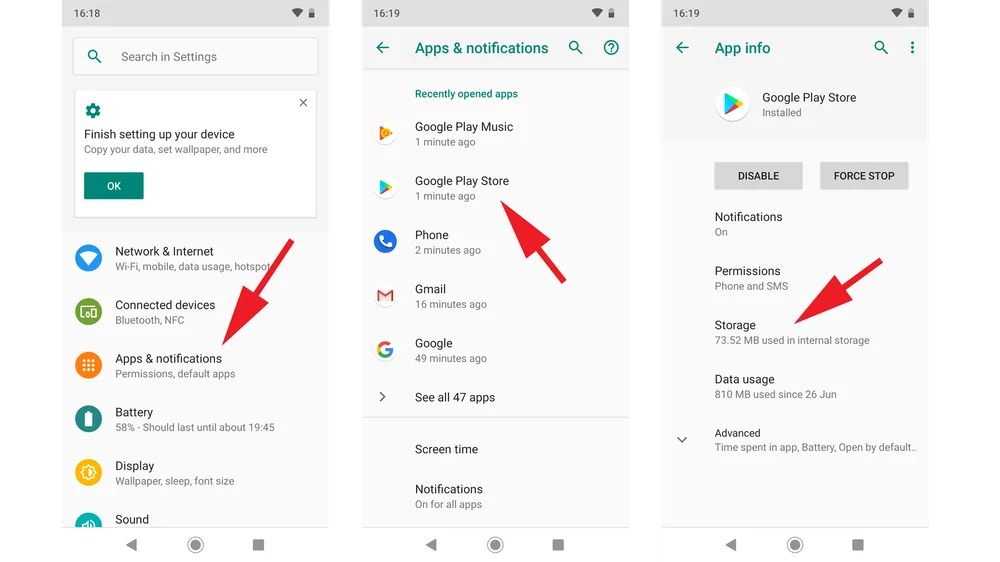
Over weeks of gameplay, video slot graphics, live studio thumbnails, and sound packages accumulate in your phone's temporary storage. Clearing this cache solves over 80% of persistent interface lag:
[Settings] ──► [Apps / Application Manager] ──► [Khela88] ──► [Storage] ──► [Tap Clear Cache] ──► [Relaunch App]Security Advice: Avoiding Counterfeit APK Packages
Because real-money gaming software is not hosted on the Google Play Store in South Asia, fraudulent syndicates sometimes distribute malicious, modified APK files designed to steal user passwords and intercept mobile financial SMS notifications.
Protect your smartphone by adhering to these safety guidelines:
Frequently Asked Questions
Why isn't the Khela88 app available on the Google Play Store?
Google's regional developer policies restrict real-money gambling and betting applications from being distributed on the Play Store in Bangladesh and India. Consequently, legitimate operators distribute installation files directly via their official websites as secure .apk packages.
Is it safe to enable "Install Unknown Apps" on my Android smartphone?
Yes, provided you are downloading the package directly from the verified Khela88 portal. The "Unknown" label simply indicates that the software was obtained outside Google's proprietary app store ecosystem.
How do I update the Khela88 app when a new version is released?
When an update becomes available, the app will automatically display a prompt upon launch stating "New Version Available". Tap "Update Now" to download and install the update seamlessly without needing to uninstall the app or re-enter your credentials.
Will clearing the app cache delete my account balance?
No. Your account balance, transaction records, and active bonuses are stored securely on Khela88's encrypted cloud database, not on your physical phone. Clearing the cache simply removes local temporary graphical assets.
Can I install the Khela88 APK on an iPhone or iPad?
No. Android .apk files cannot execute on Apple's iOS operating system. iPhone users should open Safari, navigate to the official Khela88 mobile website, tap the Share icon, and select "Add to Home Screen" to install the dedicated Progressive Web App (PWA).
Summary: Maintain Smooth Mobile Performance
By keeping your Android operating system updated, clearing temporary cache files periodically, and downloading software exclusively through verified channels, you can enjoy a fast, reliable, and uninterrupted mobile gaming experience on Khela88.
Always treat digital entertainment responsibly. If gaming ever begins to negatively affect your personal wellbeing or financial stability, seek confidential assistance from established player safety resources such as Gambling Therapy or BeGambleAware.
Ready to Play on Khela88 Bangladesh?
Experience instant bKash & Nagad cashier deposits, verified 97%+ RTP gaming, and live cricket betting exchange with 24/7 Bengali customer support.
🚀 Register & Claim 100% Welcome Match